Skip to content
Features

Everything you need to coach and grow.

Training and nutrition programs, your library, check-ins, messages and payments in one place. It works for 1:1 coaching, group coaching and courses. Running since 2019, with over 400,000 people coached.

One platform for how you coach.

Coach clients one to one, run a group or sell a course. Pick one, or run all three side by side.

  • 1:1 coaching

    Personal training and nutrition programs, one client at a time.

    • Check-ins you build yourself
    • A chat with each client

    Weekly check-in

    Emma Walker · Oct 12, 3:23 PM

    • Energy level

      4/5

    • Stress level

      2/5

    • How well did the plan fit your week?

      4/5

    Emma2 min

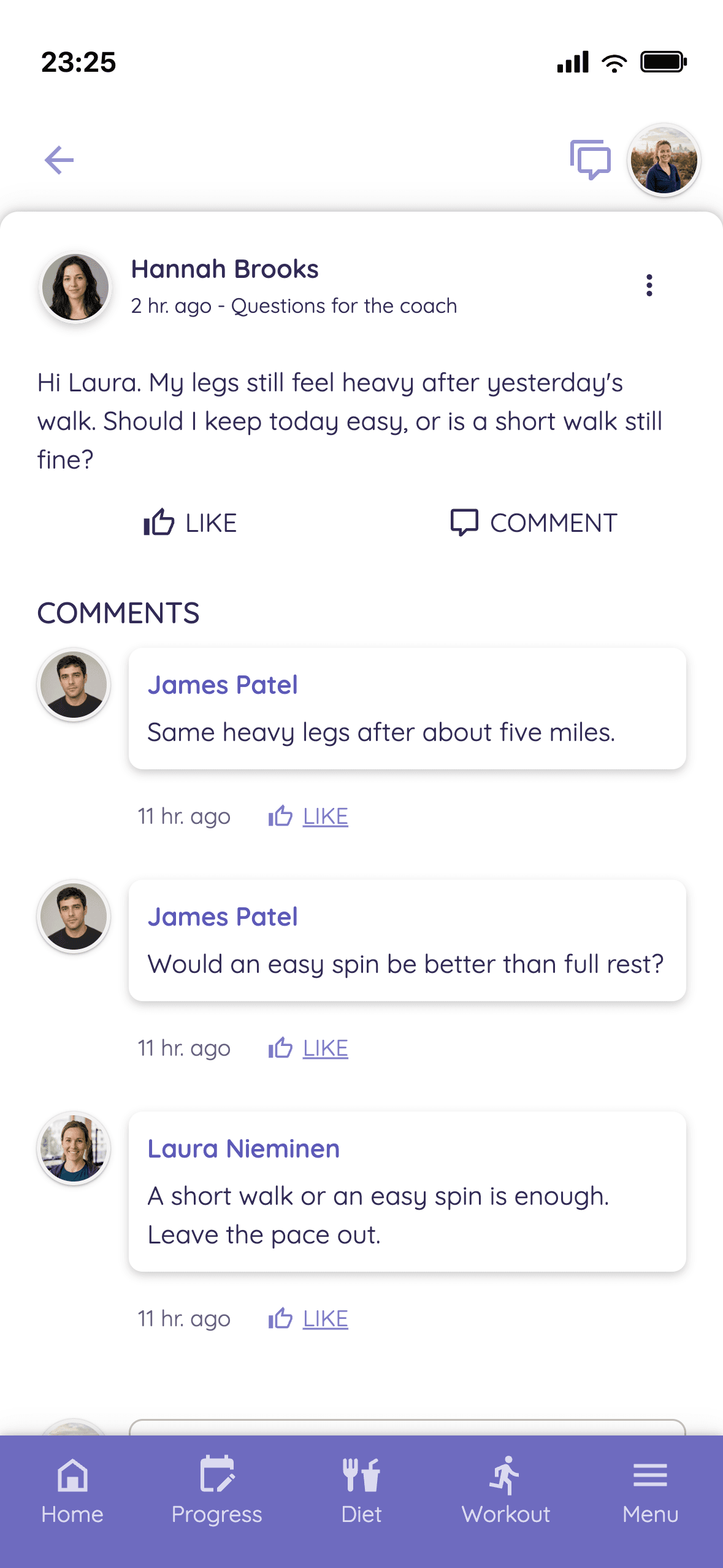
    Can I swap Thursday's run for a bike ride?
  • Group coaching

    One coaching for hundreds or thousands of clients.

    • Tailored tracks, picked by a questionnaire you build
    • Clients can switch tracks
    • A community for the coaching, with topic areas

    Everyday Strength

    Group coaching

    Intake questionnaire

    Where and how do you train?

    • Beginner track412 clients

      At the gym, just getting started

    • Experienced track287 clients

      At the gym, training for years

    • Home workout track198 clients

      At home, with little equipment

  • Courses

    A course is a coaching whose schedule starts at purchase.

    • Workouts and meals, like any coaching
    • Each client runs from their own start day
    • Add a community if you want one

    Four-Week Reset

    Course

    Started on the purchase day

    • Week 1 · 3 workouts, meals
    • Week 2 · 3 workouts, mealsOwn schedule
    • Week 3
    • Week 4

They work together.

  1. 1Start with 1:1
  2. 2Open a group when you are ready
  3. 3Sell a course on the side

Same clients, same app, same tools. Extra coaches cost nothing on any paid plan.

Read more: Your client finished the program. Now what?A community keeps clients, if you build it

Less admin, more coaching.

From nutrition and training to payments and your own brand. Jump straight to the part you need.

01Nutrition

Set the macros, recipes scale themselves.

You set the macros and the day's meals, Trainda works out the portions. The recipe picker suggests only recipes that fit the macros left for the day. Make your own recipes scale without the manual work: describe a dish or paste a recipe as text, and the AI drafts the ingredients and amounts for you to check. Clients log meals straight from the recipes or by scanning packaged food, and build their shopping list from the same recipes.

  • Recipes & Custom Meals
  • Automatic Portion Scaling
  • AI-Assisted Recipes
  • Ingredient database plus your own
  • Set calories, macro split and meal times per nutrition block, so the targets can change from one block to the next
  • Nutrition programs run in blocks like training: week by week, or at any rhythm you choose
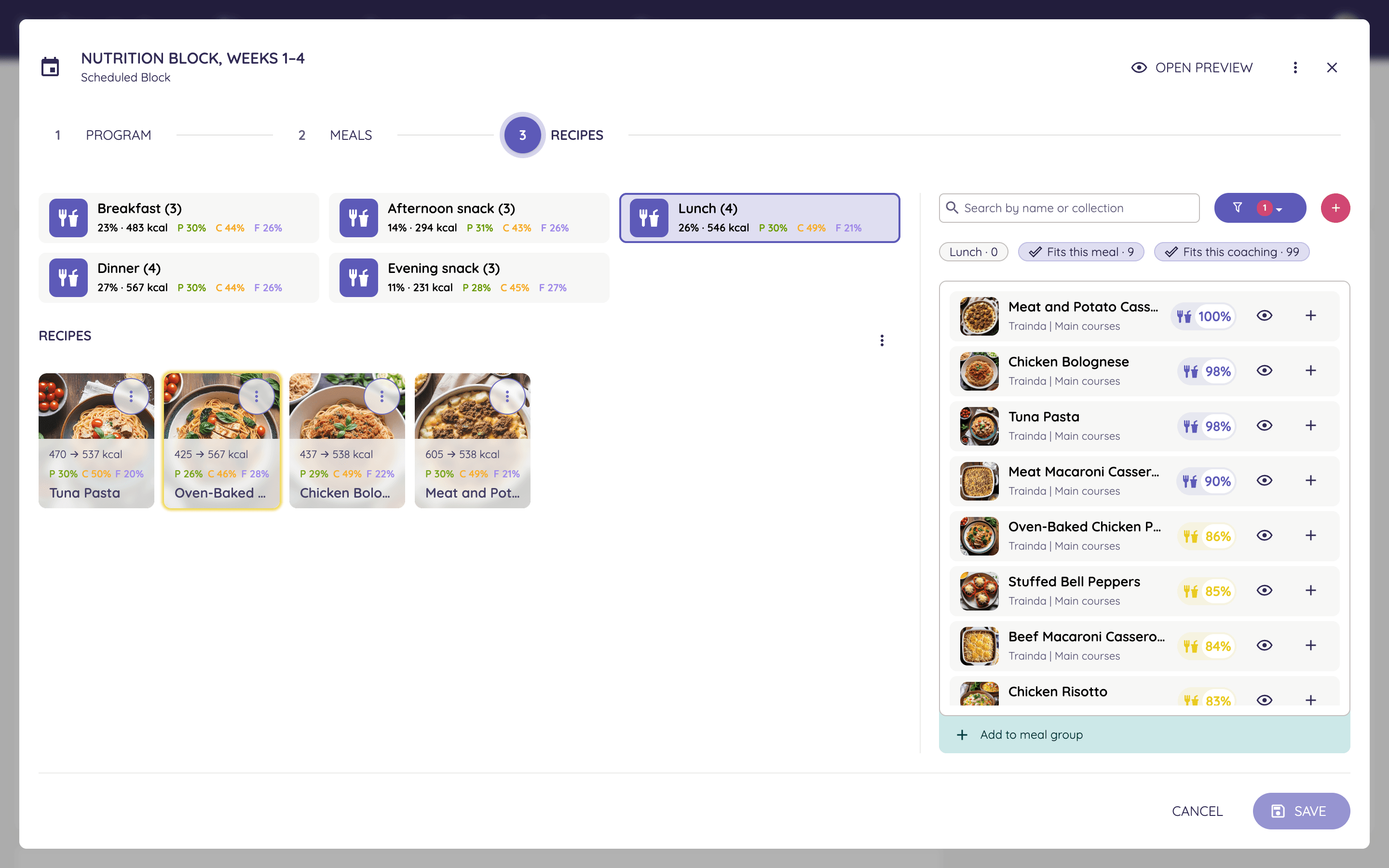
  • The recipe picker suggests recipes that fit the meal's macros, and you can offer several recipes for one meal
  • A check-in can work out the client's energy need and set the calorie target, with your own adjustment
  • A helper sets protein and fat in proportion to body weight
  • An ingredient database you can extend with your own ingredients
  • Food diary: clients scan a barcode or type in calories and macros, and a recipe from the meal plan logs with its macros filled in
  • You see every logged meal, and each day's calories and macros against the client's targets
  • Clients add the ingredients of the recipes they will cook to their shopping list
  • Sell nutrition in 1:1 coaching or group coaching, or as a course of its own
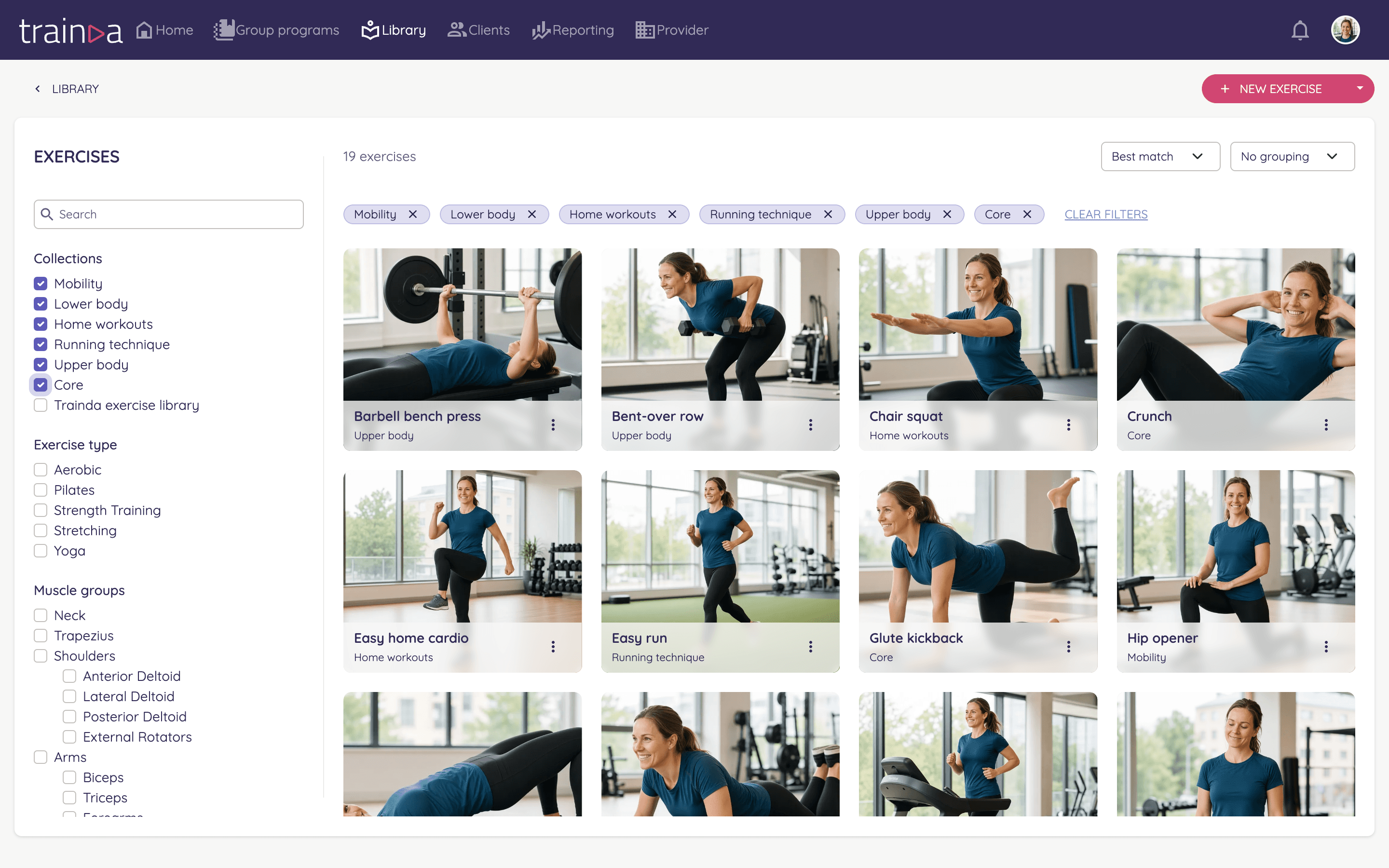
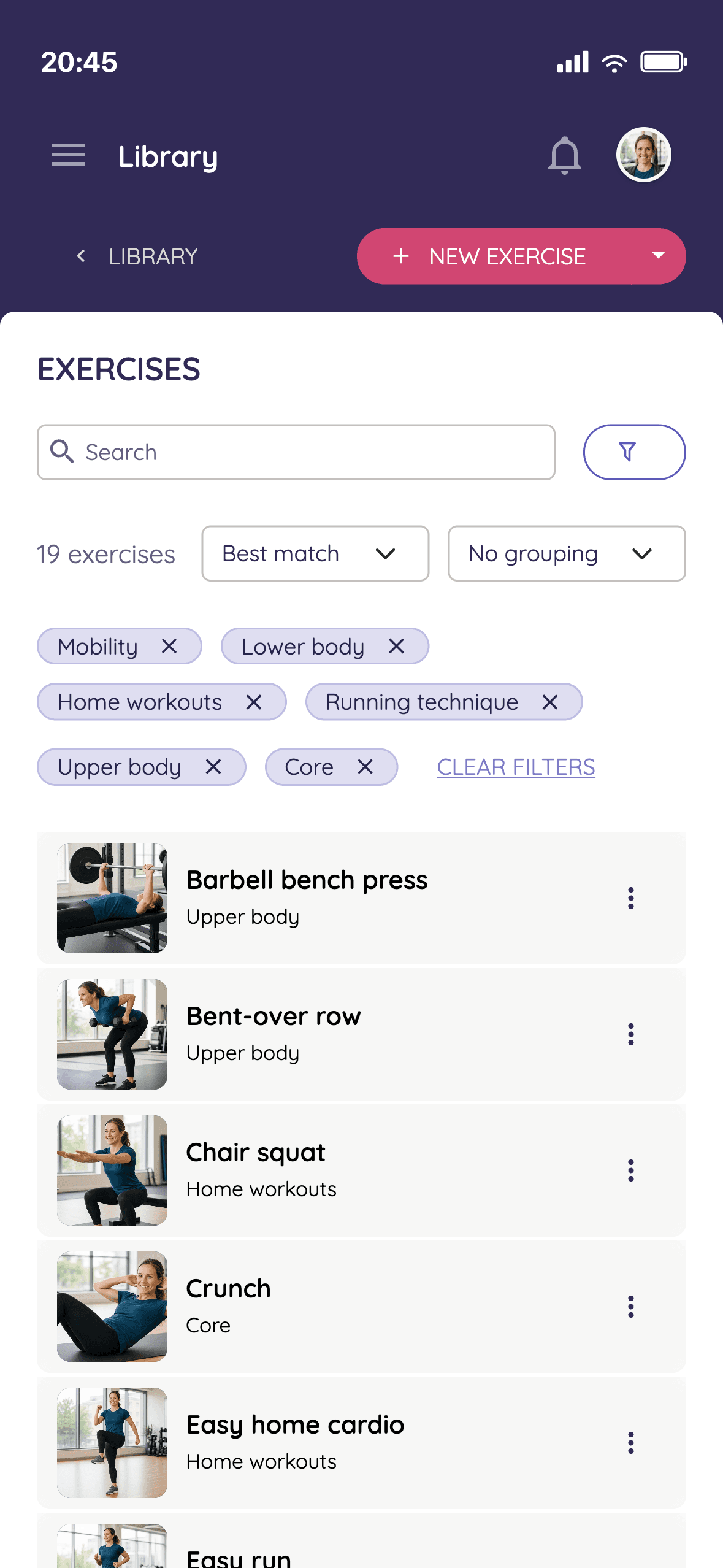
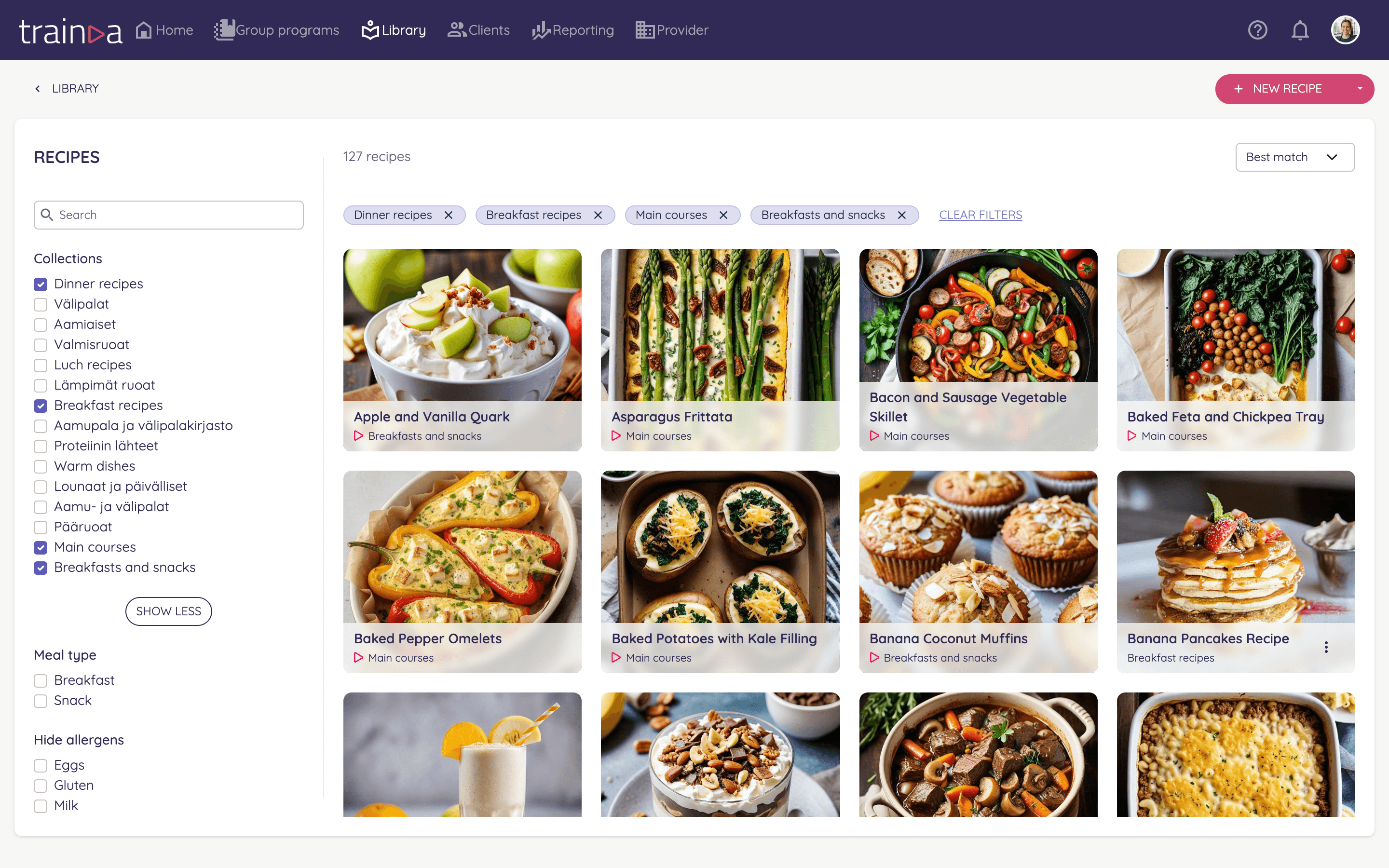
Library in the coach dashboard: your own recipe collections next to Trainda's starter recipes
Meal plan recipe picker in the coach dashboard: recipes ranked by how well they fit each meal's macro targets
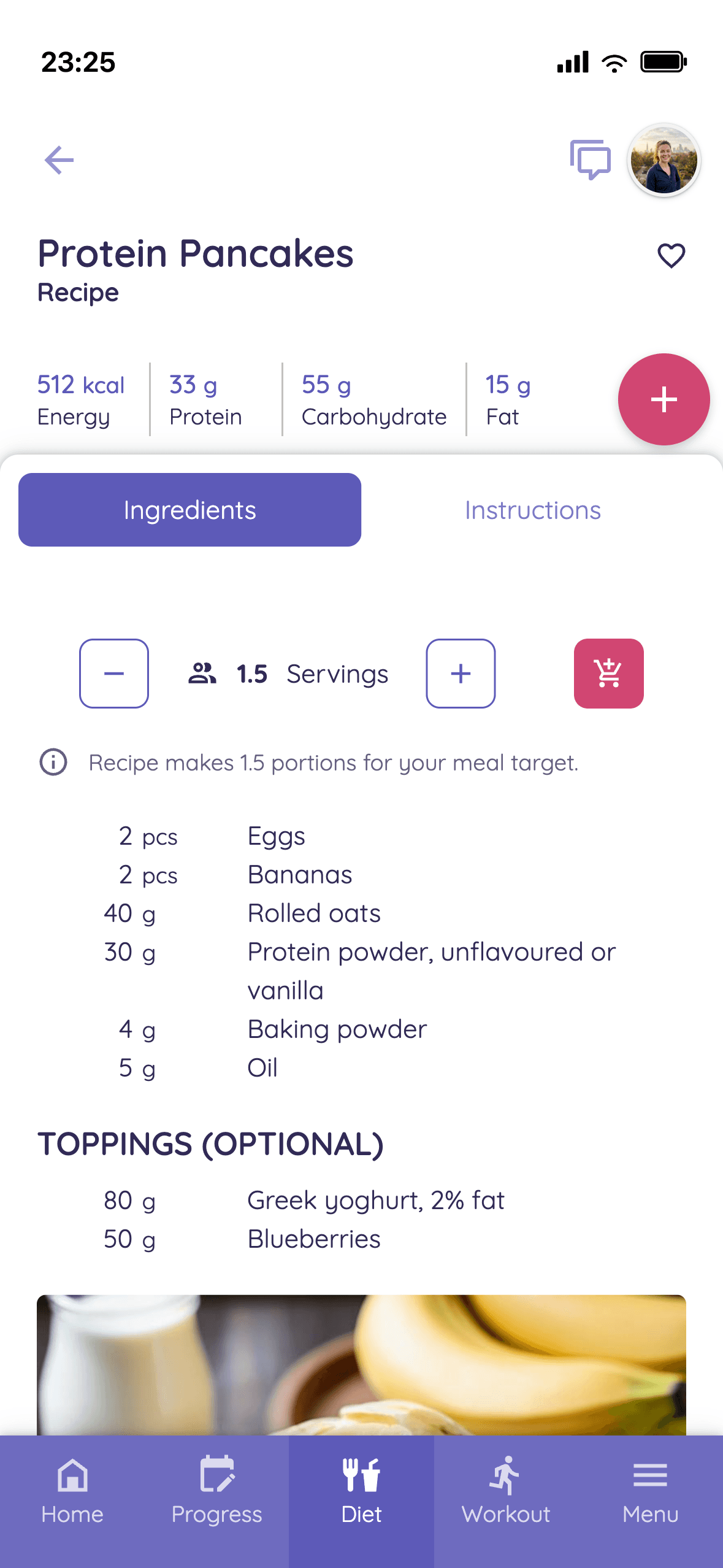
A recipe in the client app: portion scaled to the targets, macros and ingredients

02Training

Build training programs weeks ahead.

Schedule training blocks weeks ahead and the progression is ready. Combine supersets, AMRAPs and EMOMs into combined exercises: the movements stay together, and the client app keeps the time. Let the AI draft the workout and finish it yourself, picking from Trainda's 1,000+ exercises with video or your own collection. Your own exercises get your name, instructions and video, and you can give the client an alternative exercise.

  • AI-Assisted Workout Drafts
  • Training Blocks Scheduled Ahead
  • 1,000+ Exercises with Video
  • Own Instructions & Videos
  • Alternative Exercises
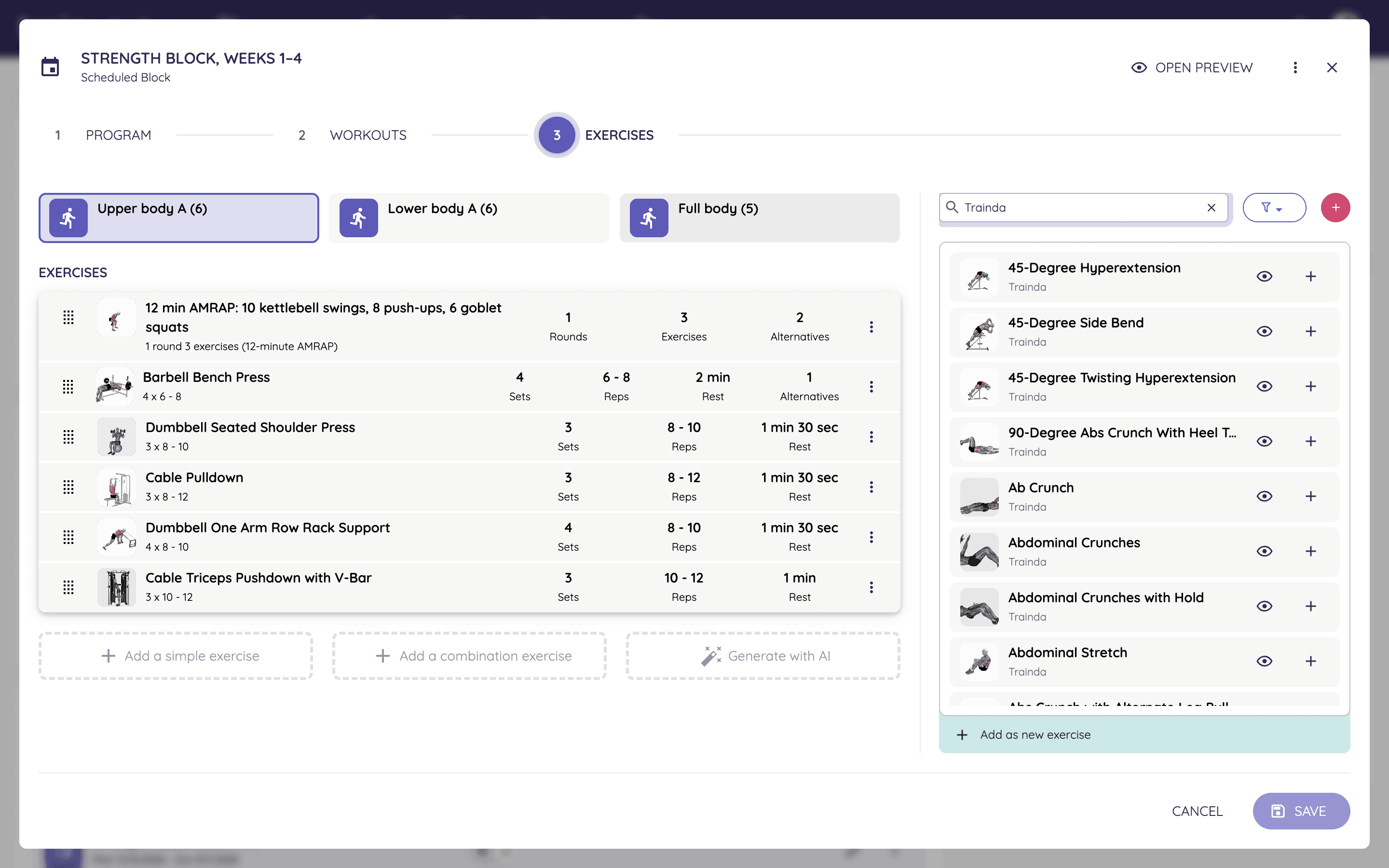
Coach dashboard: building a workout in a training block scheduled ahead
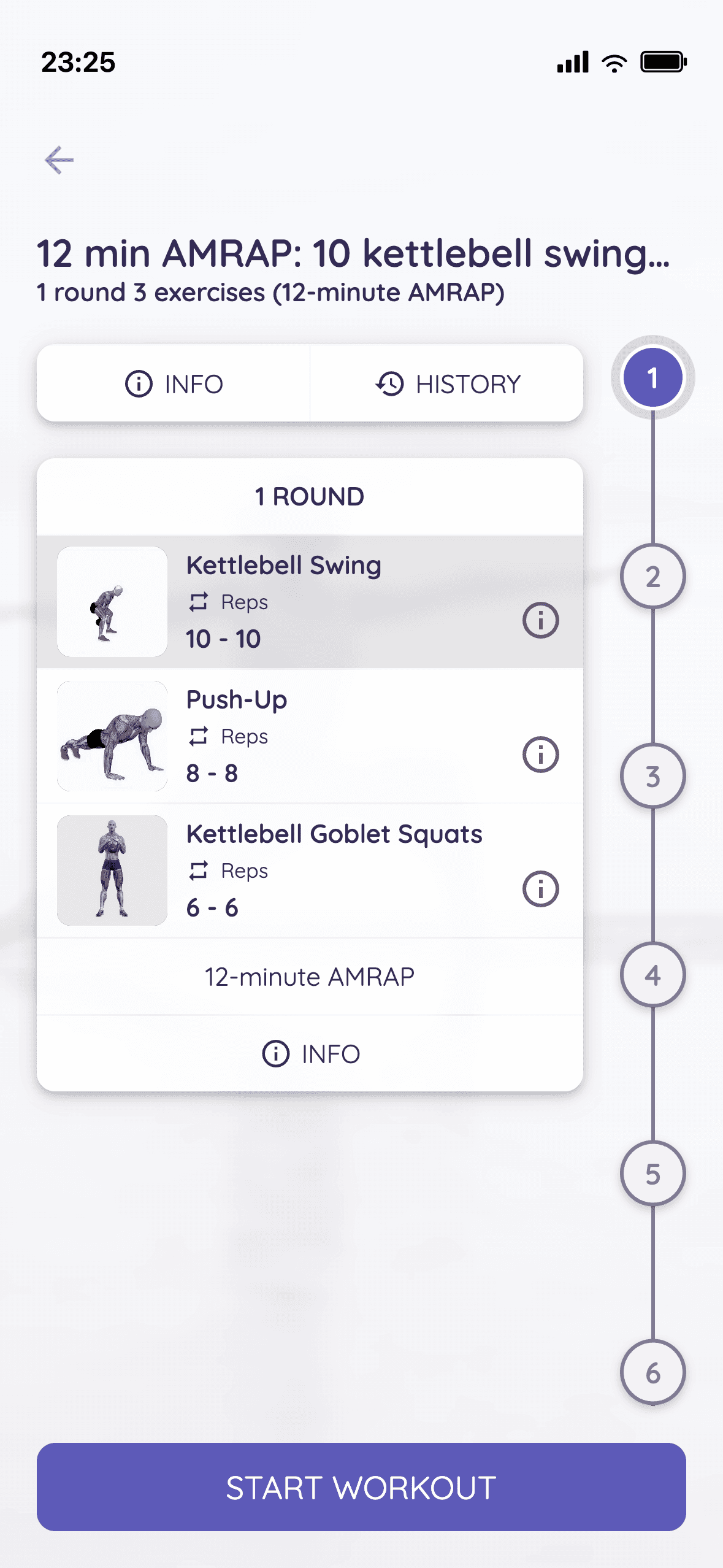
The same workout in the client app: an AMRAP combination exercise
  • AI drafts the workout, you finish it
  • Training blocks scheduled weeks ahead, so the progression is planned
  • Supersets, AMRAPs and EMOMs as one combined exercise, and the client app runs the timer
  • Pick exercises from Trainda's 1,000+ with video or from your own collections
  • An alternative exercise and your own note on any exercise
  • See one client's week in the client view and adjust it on the spot
  • Clients log reps and weight for every set, and you see them set by set and as total volume

03Library

Build your library once, use it in every coaching.

Everything you build goes into one library: exercises, recipes, templates and media. Your own collections sit next to Trainda content, so you start with Trainda's 1,000+ exercises with video and around 100 ready-made recipes, and add your own as you go. The library is ready in every coaching and course, on your computer or in your phone's browser.

  • 1,000+ Exercises with Video
  • Own Collections
  • Templates
  • AI-Assisted Recipes
  • Media
  • Your own exercises with your own videos, in your own collections next to Trainda's 1,000+ exercises with video
  • Upload a video straight from your phone or computer, or add a YouTube or Vimeo link
  • Training block and workout templates: build them once and reuse them from one client to the next
  • Your own recipe collections next to around 100 ready-made recipes from Trainda
  • Describe a dish or paste a recipe as text, and the AI drafts it, with macros calculated from the ingredient database
  • You check the draft and save it, and the recipe scales to each client's targets
  • Media: every picture, video and PDF you upload on one page, ready in every picture and video field
Library in the coach dashboard: your own exercise collections next to Trainda content
Recipes in the library: your own collections next to Trainda's ready-made recipes, with meal type and allergen filters
The library in the coach app on a phone

04Progress

See progress in one view.

Build your own check-ins: ask exactly what you want to know, and the follow-up questions adapt to the answers. Steps and workouts come straight from the client's watch or ring through Apple Health or Android Health Connect, whether it is an Apple Watch, Garmin, Polar or Oura. Weight and measurements the client logs in the journal or a check-in. One view shows it all, and you can drill down into the history and the details of their progress.

  • Check-Ins
  • Steps & Workouts from Watches
  • Progress & Tracking
  • Weight & Body Measurements
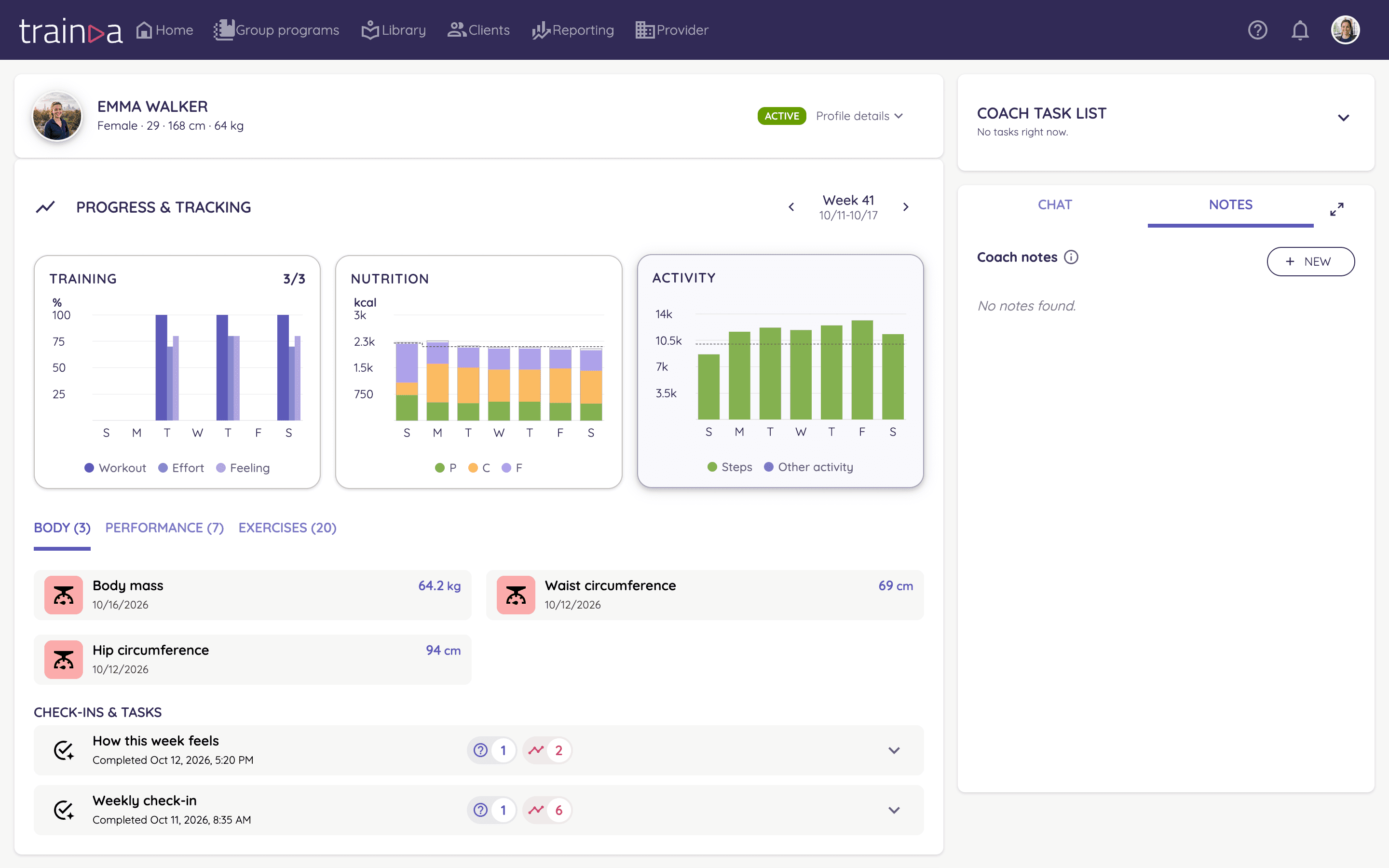
Client view in the coach dashboard: the client's week
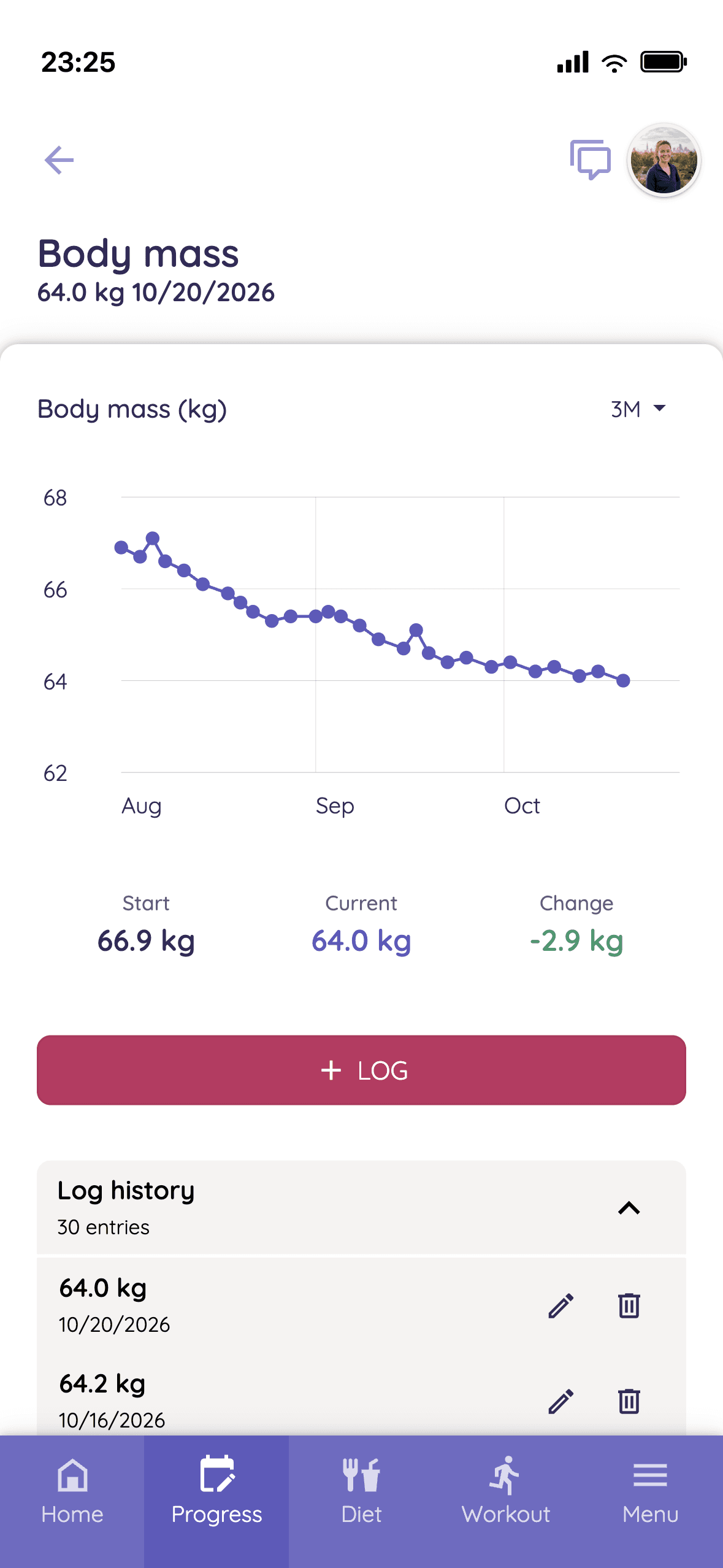
Weight trend in the client app

Weekly check-in

Emma Walker · Oct 12, 3:23 PM

  • Energy level

    4/5

  • Stress level

    2/5

  • How well did the plan fit your week?

    4/5

  • Today's weight

    64.0 kg

  • What went well this week?

    All three workouts done, and breakfast worked every day.

  • Build your own check-ins: questions branch on the answers, several can run at once and you schedule them freely
  • Steps and workouts come from the client's watch or ring through Apple Health or Android Health Connect, with no sharing step
  • Apple Watch, Garmin, Polar, Oura, WHOOP, Samsung Galaxy Watch and Google Pixel Watch are just examples: any watch or ring that syncs steps and workouts with Apple Health or Health Connect works
  • Weight and body measurements from the client's journal or a check-in
  • Go through the client's journal and submitted tasks week by week, and any entry opens its long-term history, trends and graphs
  • Recurring habit check-ins
  • A 1:1 client's completed task lands in your queue on the coach app's front page

05Messages & check-ins

See at a glance who is waiting for your reply.

Program in a spreadsheet, meals in a PDF, check-ins in WhatsApp? In Trainda your client trains, logs food and messages you in one app.

Messages, 1:1 check-ins and community posts from the topics you choose land in one queue on the front page of the coach app, unanswered first. Reply with text, voice or video and mark it done without leaving the queue. Filter by group coaching, topic, coach or client tag. Even in a big group, only the topics you pick reach the queue.

  • Messages, Check-Ins & Posts
  • Voice & Video Messages
  • Unanswered First
  • Emma2 min

    Can I swap Thursday's run for a bike ride?
  • Olivia15 min

    Answered the weekly check-in

  • Noah1 h

    Voice message, 0:48

  • Liam3 h

    Post in Meals: My Sunday meal prep

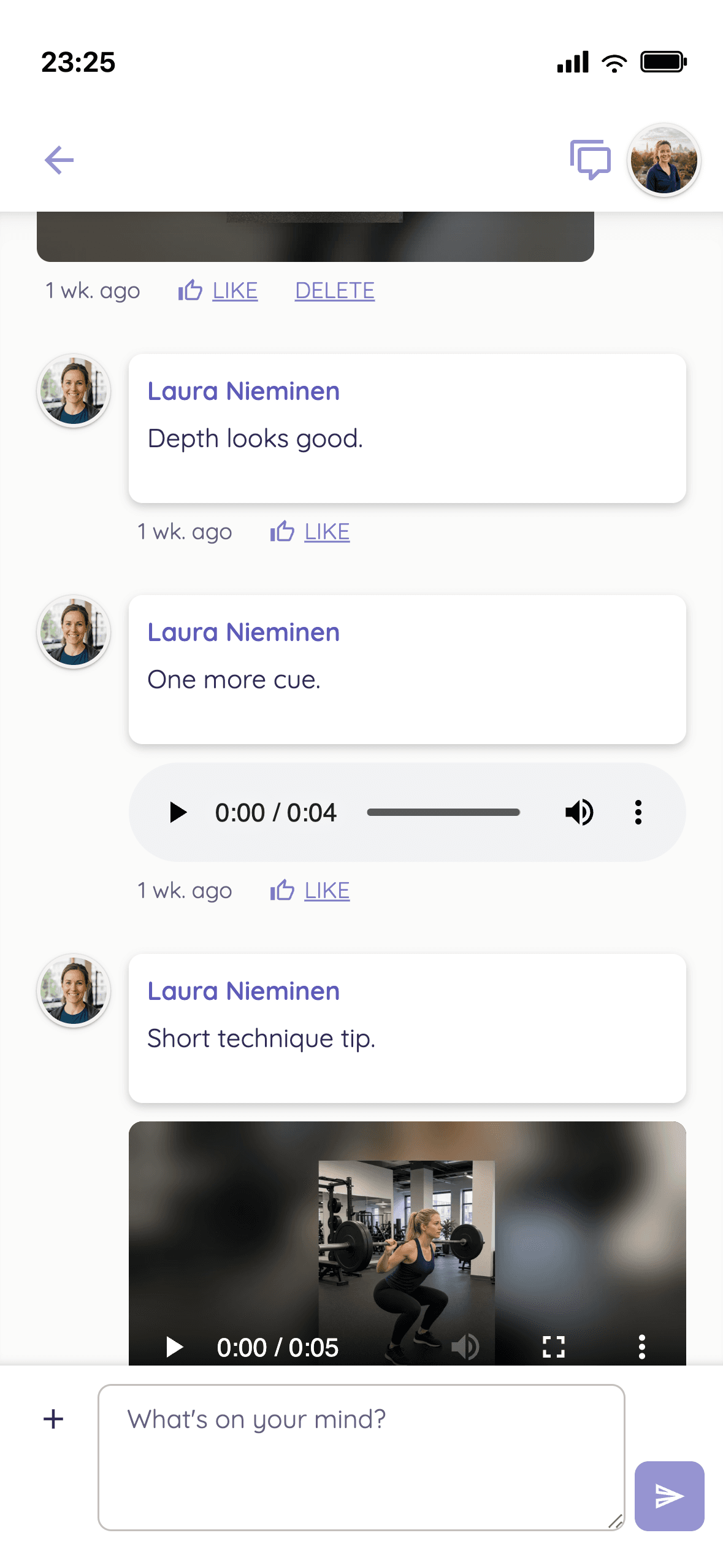
Chat in the client app: the client's squat photo, then the coach's text, voice message and video reply
  • Filter answered and unanswered items too
  • Voice messages and videos in chat
  • Send one message to many clients at once
  • Schedule posts in a group coaching's community
  • Chat messages and attachments are stored encrypted

06Group coaching

Scale group coaching without losing quality.

One group coaching, several tracks. Not everyone needs the same program: a questionnaire you build picks each client's track from their answers, and clients can switch tracks when their needs change. That lets a cohort run to hundreds or thousands of clients. A community for each coaching keeps clients engaged and coming back. The same works for courses, which start at purchase and run at the client's own pace.

  • Tailored Tracks
  • Hundreds or Thousands of Clients
  • A Community for Each Coaching
  • Extra Coaches Free

Everyday Strength

Group coaching

Intake questionnaire

Where and how do you train?

  • Beginner track412 clients

    At the gym, just getting started

  • Experienced track287 clients

    At the gym, training for years

  • Home workout track198 clients

    At home, with little equipment

The group coaching's own community in the client app: topics and threads
  • A questionnaire you build picks each client's track from their answers
  • Clients can switch tracks when their needs change
  • A community for each coaching, with topic areas and threads
  • Starting tasks for each coaching, built once and reused through a template
  • Clients see on the app's home screen which tasks and workouts are due
  • A course starts at purchase and runs at the client's own pace, with a community if you want one
  • Several coaches in one account, extra coaches free on every paid plan

07Payments

Charge clients your way, with 0% commission.

Many coaching platforms take a cut of every client payment. Trainda does not. Bill recurring coaching monthly, quarterly or yearly. Sell one-off packages, courses for a single payment and bundles at a package price too. The Stripe account is yours.

  • Recurring Billing with Stripe
  • One-Off Packages
  • 0% Sales Commission
Sarah Mills

Group coaching

Everyday Strength

  • Monthly membership

    Renews monthly

    First 7 days free

    €89/month

  • 3-month membershipMost popular

    Renews every 3 months

    €239/3 months

  • Yearly membership

    Renews yearly

    €890/year

Trainda's share of your sales

0%

Payments go to your own Stripe account

  • Stripe payments for memberships and one-off sales: included in Growth, a paid add-on on Pro10 and Pro30
  • No sales commission: Trainda takes no share of your sales
  • Memberships renew monthly or every 3, 6 or 12 months
  • A sales page holds up to five prices, each with an optional free trial
  • A subscription that unlocks a set of programs, with a limit on how many run at once
  • Stripe payments are optional: you can bill clients any other way too

08Branding

A client app that looks like you.

From Growth onwards, clients see your logo and colors in the app the moment they join. On Enterprise you get your own apps under your own name in the App Store, Google Play and the web browser. Clients get the app menus in their own language: Finnish, Swedish, English, German or Estonian.

  • Your Logo & Colors from Growth
  • Finnish, Swedish, English, German, Estonian
  • Own Apps on Enterprise
  • Free, Pro10 and Pro30: the Trainda-branded client app
  • From Growth onwards, clients see your logo and colors in the app when they join your coaching
  • Enterprise: your own apps under your own name in the App Store, Google Play and the web browser
  • The coach app in Finnish and English, in the browser on computer and phone
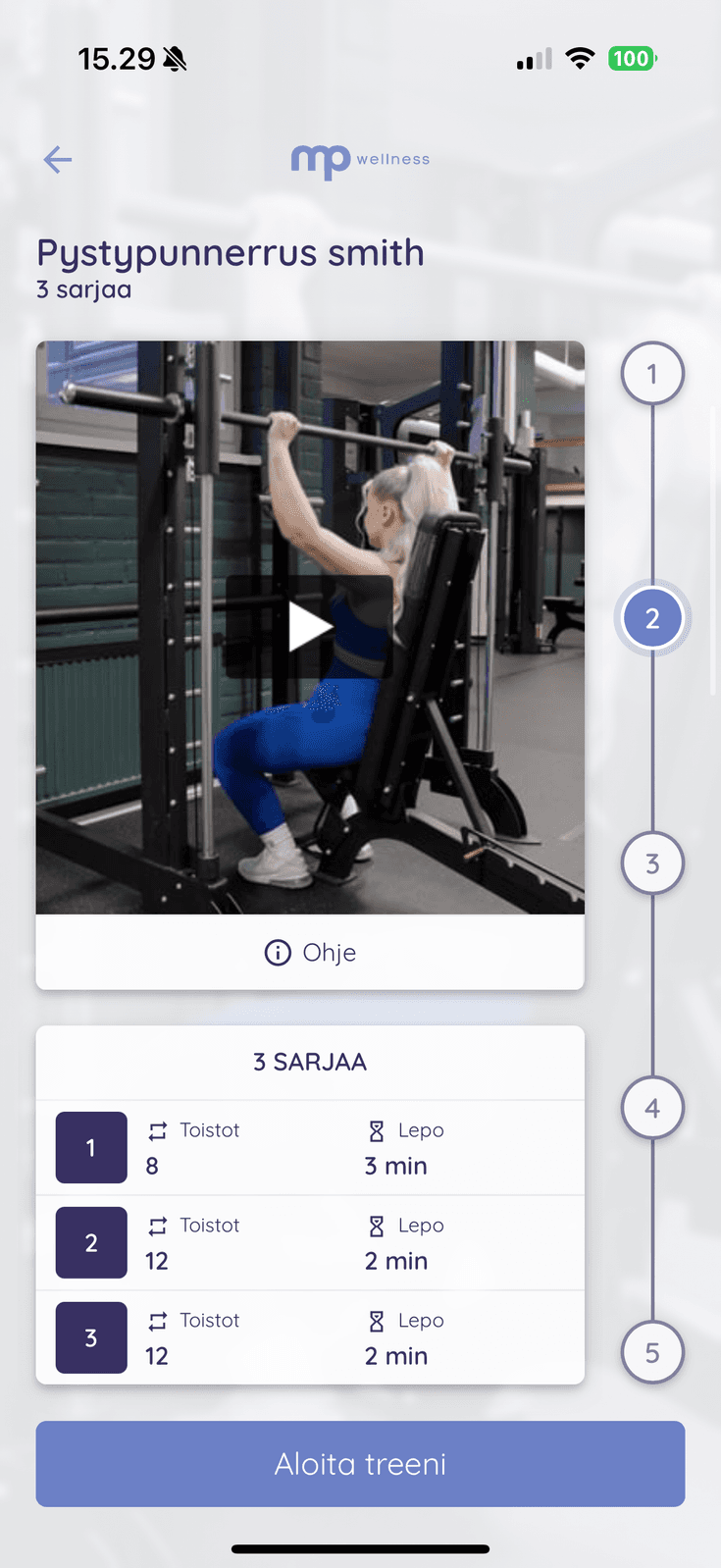
  • A workout in the client app with the coach's logo and colors
    MP Wellness
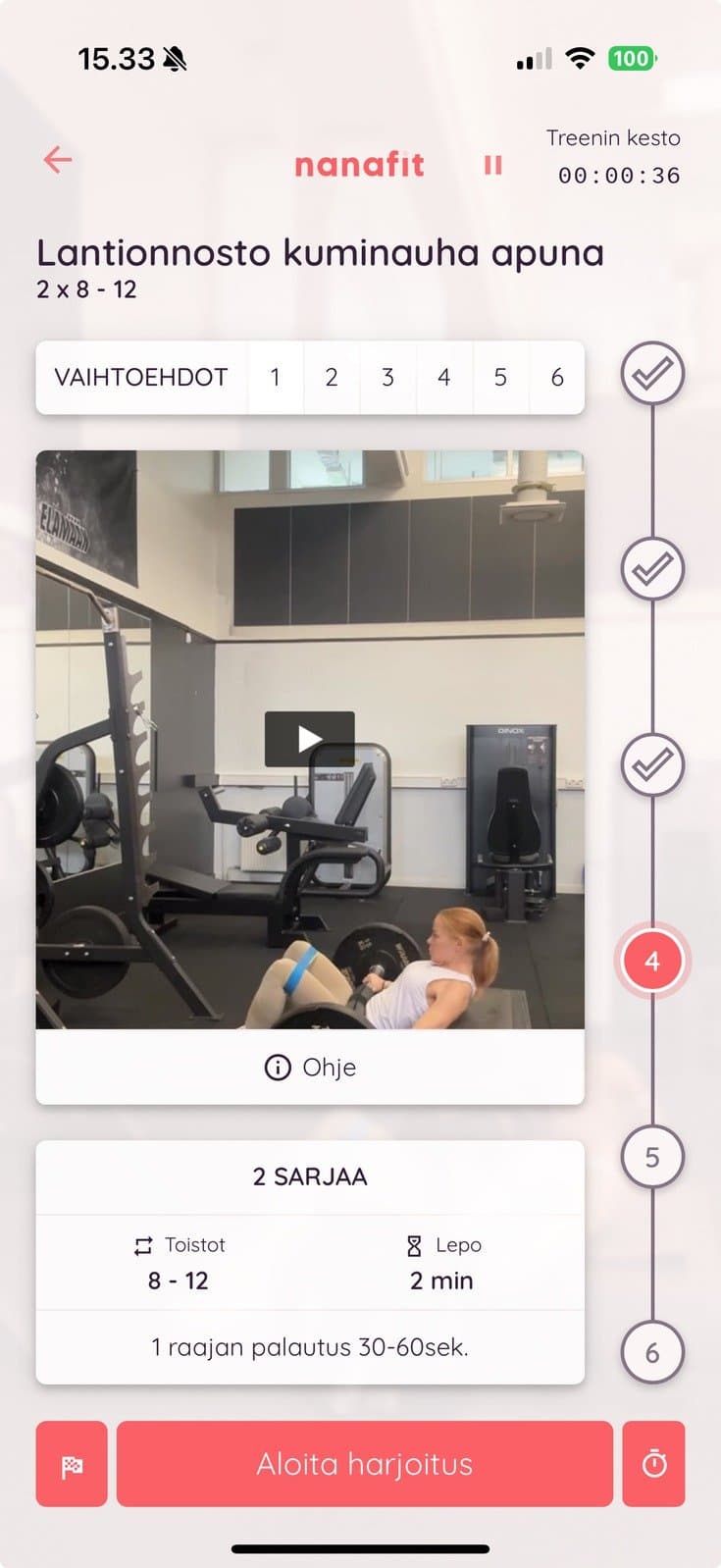
  • Workout day in the client app showing an alternative exercise
    Nanafit
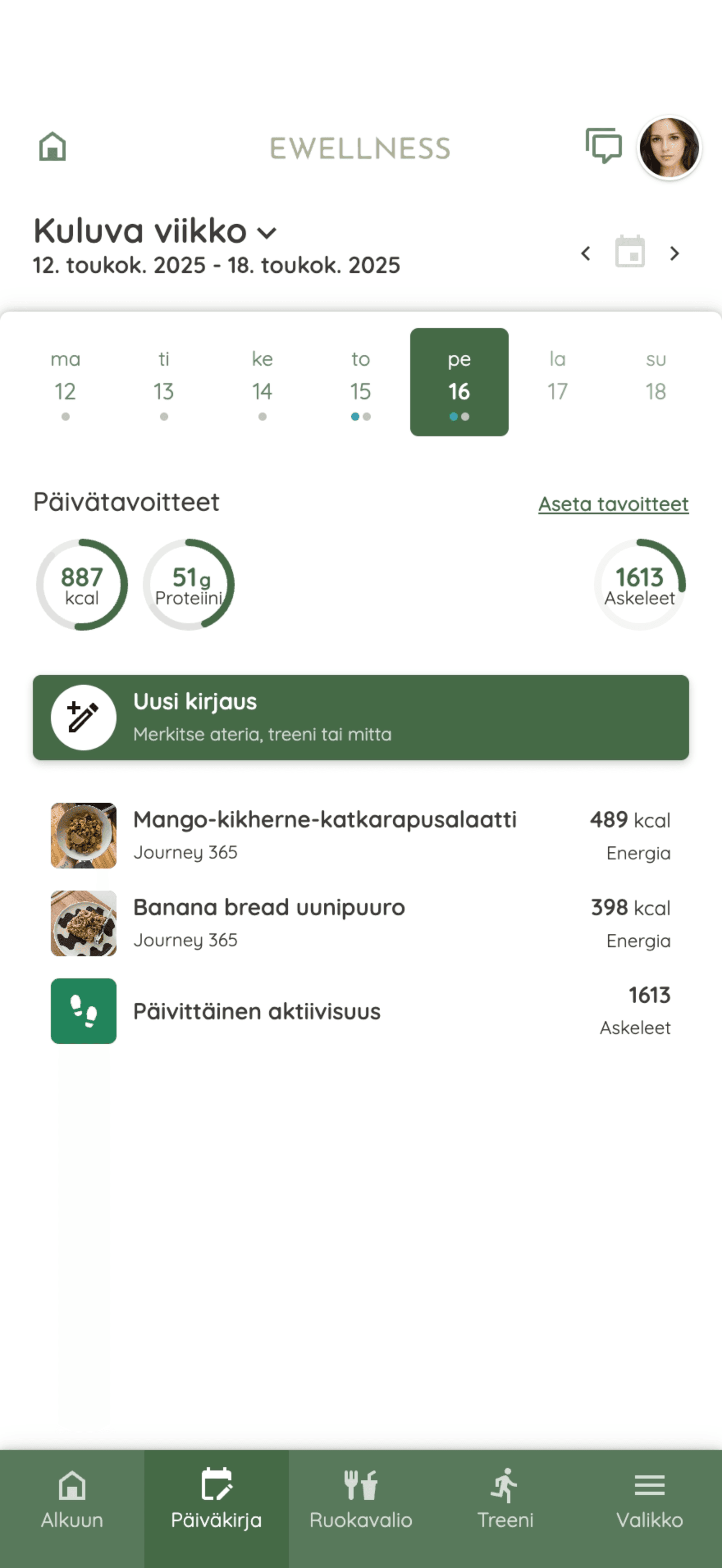
  • Journal in the client app with the coach's logo and colors
    E Wellness

See pricing for your roster

Pick a plan by included client seats. Upgrade when it makes sense.

See pricing